
The Hong Kong startup combines 3D-printed reef tiles, biodiversity monitoring and long-term data to help companies manage their impact on marine ecosystems.
Updated
August 18, 2026 11:32 PM

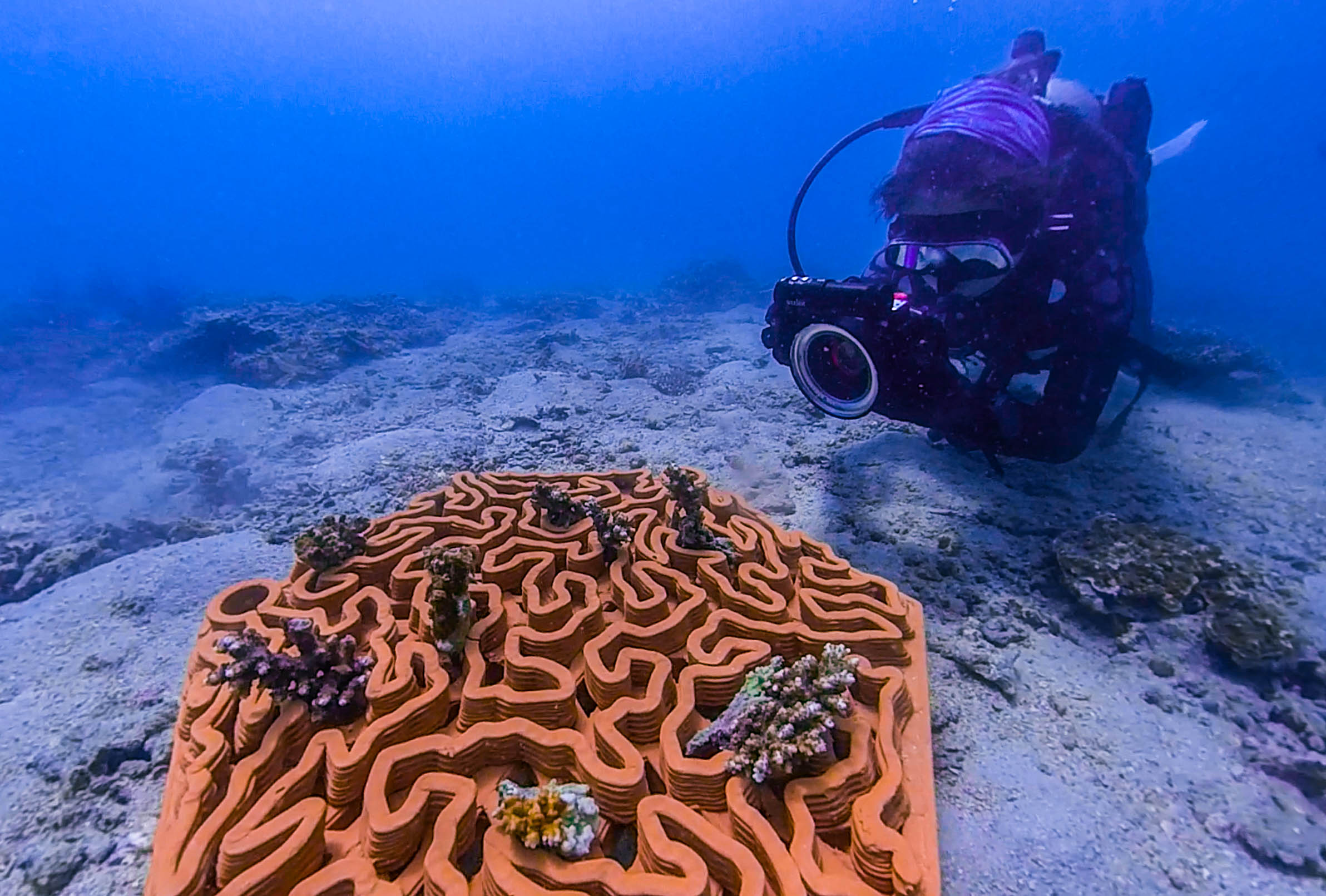
Young corals growing on Archireef's 3D-printed terracotta reef tiles beneath the sea. IMAGE: ARCHIREFF
Anyone who has snorkeled over a coral reef has probably admired its vibrant colours and the marine life swimming between its branches. What is less visible is how easily these ecosystems can be damaged. Rising ocean temperatures and pollution continue to put reefs under pressure, while coastal development creates another threat. Construction can stir up sediment that settles on corals, blocking the sunlight they need and making it harder for damaged reefs to recover.
Protecting marine ecosystems is becoming a shared responsibility. Alongside scientists, governments and conservation groups, businesses whose operations affect the ocean are increasingly expected to understand, manage and reduce their environmental impact. They must also show regulators, banks and investors that they are meeting their environmental commitments.
Archireef helps businesses meet those demands. Founded by Vriko Yu, the Hong Kong-rooted B2B startup specializes in marine ecosystem restoration and ocean nature risk management. Drawing on years of research at the University of Hong Kong, Yu built the company to help organisations understand, measure and reduce their impact on marine ecosystems.
Yu describes Archireef as an “end-to-end ocean nature risk management company”.
“What we offer them is a credible way to meet those obligations and stand behind the results,” she says.
One of the company’s main tools for restoring damaged marine ecosystems is its flagship 3D-printed terracotta reef tile. The tiles provide a stable foundation where young corals can attach, grow and survive over time.
Archireef chose terracotta instead of concrete and other conventional materials because it is pH-neutral and does not release harmful chemicals into the water. Its surface also gives corals a suitable place to attach naturally.
Before placing a single tile in the ocean, the team studies the proposed restoration site to determine whether recovery is possible. It assesses the water quality, biodiversity and general health of the ecosystem. As Yu explains, restoration should begin only where nature has a realistic chance to recover.
“Restoration isn’t about replacing nature or engineering a reef into existence. It is about removing the barriers and giving a degraded system the conditions it needs to begin recovering on its own”, she says.
Once the team selects a site, divers carefully place the tiles on the seabed. Their curves, ridges and crevices imitate the structure of a natural coral reef, creating sheltered spaces for marine species. The design also helps limit sediment build-up, which can block sunlight and smother young corals.
.webp)
Archireef adjusts the shape of its reef tiles for each project.
“There’s no universal reef, so there’s no universal tile”, Yu says.
Instead of producing one standard model, the company adapts each design to the coral species, water conditions and surrounding marine environment. A coral restoration project in Hong Kong may therefore require a different tile from one in Saudi Arabia, even when the same manufacturing process is used.
“The biggest adaptation from site to site is usually the match between design, species and environment, not the manufacturing itself ”, Yu explains.

Although the reef tile is Archireef’s most recognizable innovation, Yu sees it as one part of a much broader service.
“The reef tile gets the attention because it’s tangible,” she says. “But the real product is the proof — defensible, audit-ready evidence of nature recovery that an organization can put in a disclosure and stand behind under scrutiny”.
Producing that evidence requires years of biodiversity monitoring. Long after the reef tiles have been installed, Archireef continues to track coral survival and the health of the surrounding marine ecosystem. Its monitoring methods include ecological surveys, AI-assisted species recognition, photogrammetry and environmental DNA testing.
Photogrammetry uses photographs to produce detailed 3D models of the reef. These models allow the team to measure changes in coral growth and reef structure over time.
Environmental DNA, commonly known as eDNA, offers another way to monitor marine biodiversity. Traditional ecological surveys often depend on divers recording the species they can see. eDNA testing instead examines traces of genetic material left in the water by marine organisms, including skin cells, mucus and waste.
By analyzing these traces, Archireef can detect species that may be hidden, difficult to identify or absent during a dive. This gives the company a more complete picture of the ecosystem and how it is changing.
For Archireef, the success of a coral reef restoration project is determined by what happens several years after installation.
“The indicators that matter aren’t the ones that look good on deployment day”, Yu says. “They’re the ones that show, two, three and five years on, whether a genuine ecosystem is establishing and sustaining itself”.
At the company’s first restoration site in Hoi Ha Wan, Hong Kong, around 90% of the transplanted corals remained alive four years after deployment. The long-term survival rate suggests that the ecosystem is recovering rather than simply appearing healthy during the early stages of the project.
Results like these have helped Archireef move beyond academic research and secure collaborations across the public and private sectors. In Hong Kong, the company has worked with government departments and public organisations responsible for coastal infrastructure and marine conservation.
Keep Reading
Can AI companions really help with our mental health?
Updated
January 8, 2026 6:35 PM

A laptop with the text "MENTAL HEALTH" displayed. PHOTO: PEXELS
As technology continues to weave itself into the fabric of our daily lives, it’s starting to play an unexpected role: supporting our mental health. AI companions—digital entities designed to hold natural, empathetic conversations—are emerging as a new frontier in emotional care. Unlike chatbots of the past, these AI companions leverage advanced algorithms and emotional intelligence to provide personalized support, making them more than just tools. They are companions in every sense of the word—always available, always listening, and always ready to offer comfort. But can AI companions truly help us feel better, or are they just another tech trend? Let’s dive into how these digital allies are reshaping mental health care and what their growing presence means for our emotional well-being.
Loneliness is often called an epidemic, with millions of people worldwide feeling isolated or disconnected. While human relationships are irreplaceable, AI companions offer a consistent and accessible alternative to combat feelings of loneliness.
These companions don’t just respond—they engage. They remember your preferences, ask follow-up questions, and adapt their conversations to your needs. Imagine having someone to talk to at any time of day, about anything on your mind, without fear of judgment. AI companions may not replace a human friend, but they can provide a sense of presence and connection that can be profoundly comforting.
In a world where reaching out to others can sometimes feel daunting, AI companions offer a simple solution: they’re always there. This consistency can help people feel less alone, fostering a sense of connection in an increasingly disconnected world.
We all experience moments of stress, sadness, or doubt, and having someone to turn to during those times can make all the difference. AI companions are designed with emotional intelligence, enabling them to recognize and respond to your feelings in real time.
Through sentiment analysis and adaptive learning, these companions can detect when you’re feeling low and tailor their responses to provide comfort. Whether it’s offering words of encouragement, suggesting self-care activities, or simply listening, they provide a safe space to process emotions.
Unlike traditional apps that focus on tracking habits or delivering generic advice, AI companions meet you where you are emotionally. This personalized approach can help users feel truly supported, even in their most challenging moments.
For many of us, expressing our thoughts and emotions openly can feel like a risk. Fear of judgment, misunderstanding, or even burdening others often holds us back. AI companions offer an alternative: a completely private, judgment-free space to share whatever is on your mind.
Talking things out—whether it’s frustrations from the day or deeper personal struggles—can be incredibly therapeutic. And with AI companions, there’s no need to worry about being misunderstood or dismissed. You can let your guard down, explore your feelings, and reflect on your experiences with total freedom.
This safe space for self-expression can be especially valuable for those who struggle to open up to others. It’s not about replacing human relationships but about having an outlet that’s always available and entirely focused on you.
Self-doubt is a common barrier to personal growth, and many of us battle negative self-talk daily. AI companions are programmed to combat this by offering positive reinforcement and encouragement.
For example, if you express doubt about your abilities, an AI companion might respond with affirmations like, “You’ve accomplished so much already—don’t forget how capable you are.” Over time, these small but meaningful interactions can help shift your mindset, replacing self-criticism with self-compassion.
This ability to mirror supportive, affirming conversations can build confidence and foster a more positive self-image. It’s a subtle but powerful way AI companions can contribute to emotional well-being.
AI companions are more than just a tech trend; they represent a new way of thinking about mental health care. By offering companionship, emotional support, safe spaces for self-expression, and tools for mindfulness, they empower users to take control of their well-being.
While they may not replace traditional methods of care, AI companions are making mental health support more accessible, immediate, and personalized. They’re a reminder that sometimes, the smallest interactions—an encouraging word, a moment of mindfulness, or a listening ear—can have the biggest impact.
As we embrace this new era of technology, one thing is clear: AI companions are not just about convenience. They’re about connection, support, and the potential to make emotional care a part of everyday life. And in a world that often feels disconnected, that’s something worth celebrating.