
Take charge of your finances with these top budget monitoring apps that make tracking spending simple, smart, and stress-free.
Updated
January 8, 2026 6:36 PM
.webp)
A phone next to a laptop, displaying a stock market app. PHOTO: UNSPLASH
Managing personal finances can feel overwhelming, especially with the countless expenses we juggle daily. Thankfully, budget monitoring apps are hereto save the day. These handy tools help you track your spending, set financial goals, and build better money habits—all from the convenience of your smartphone.
Whether you're saving for a vacation, paying off debt, or just trying to avoid those end-of-the-month surprises, budget tracker apps can provide clarity and control over your finances. Here are 5 budget monitoring apps that will keep your spending on track.
If simplicity is what you’re after, Monefy is the solution. Known for its highly intuitive interface, Monefy lets users track their spending with just a few taps. Unlike many budget apps that overwhelm you with features, Monefy focuses on the essentials, making it great for beginners or anyone looking for a straightforward way to manage their money.
Monefy is perfect for users who want a no-frills app to track spending or beginners just dipping their toes into budgeting.
Budgeting doesn’t have to feel like a chore, and Fortune City proves just that. This app gamifies your financial habits by turning expense tracking into a city-building game. Every category of spending contributes to your virtual city’s development, making it an enjoyable way to visualize where your money is going.
Fortune City is ideal for those who find traditional budgeting boring or intimidating and want a fun way to stay consistent.
Jupiter combines the best of both worlds: digital banking and budgeting. This app integrates directly with your bank account, automatically categorizing transactions and providing insights into your spending patterns. It’s not just a budget tracker—it’s a full-fledged financial assistant.
Jupiter is best for users who want a hands-off budgeting experience and prefer an all-in-one app for banking and money management.
Inspired by the envelope budgeting method, GoodBudget offers a digital twist on this classic approach. Instead of physical envelopes, you allocate your money into virtual "envelopes" for different spending categories. This app encourages disciplined spending and is particularly effective for budgeters who like to plan ahead.
GoodBudget is ideal for planners who like a structured approach to budgeting and don’t mind manual tracking.
Wally is a feature-packed app designed for users who want deep insights into their spending habits. Its sleek design, multi-currency support, and detailed financial reports make it a standout option, especially for frequent travelers or professionals juggling multiple accounts.
Wally is perfect for users who want advanced budgeting tools and detailed insights, especially those with international financial needs.
Budget monitoring apps are powerful tools that simplify the often-daunting task of managing your finances. Whether you’re drawn to the playful gamification of Fortune City, the structured approach of GoodBudget, or the all-in-one convenience of Jupiter, there’s an app tailored to your preferences and goals.
These apps don’t just track your spending—they help you build better habits, gain financial clarity, and take control of your money. With the right app in your pocket, managing your budget becomes less of a chore and more of are warding journey toward financial freedom. So why wait? Choose an app, start tracking, and watch your financial confidence grow!
Keep Reading
The Australian startup uses edge AI to detect near misses, analyse traffic risks and help road infrastructure respond in real time.
Updated
September 3, 2026 4:08 PM
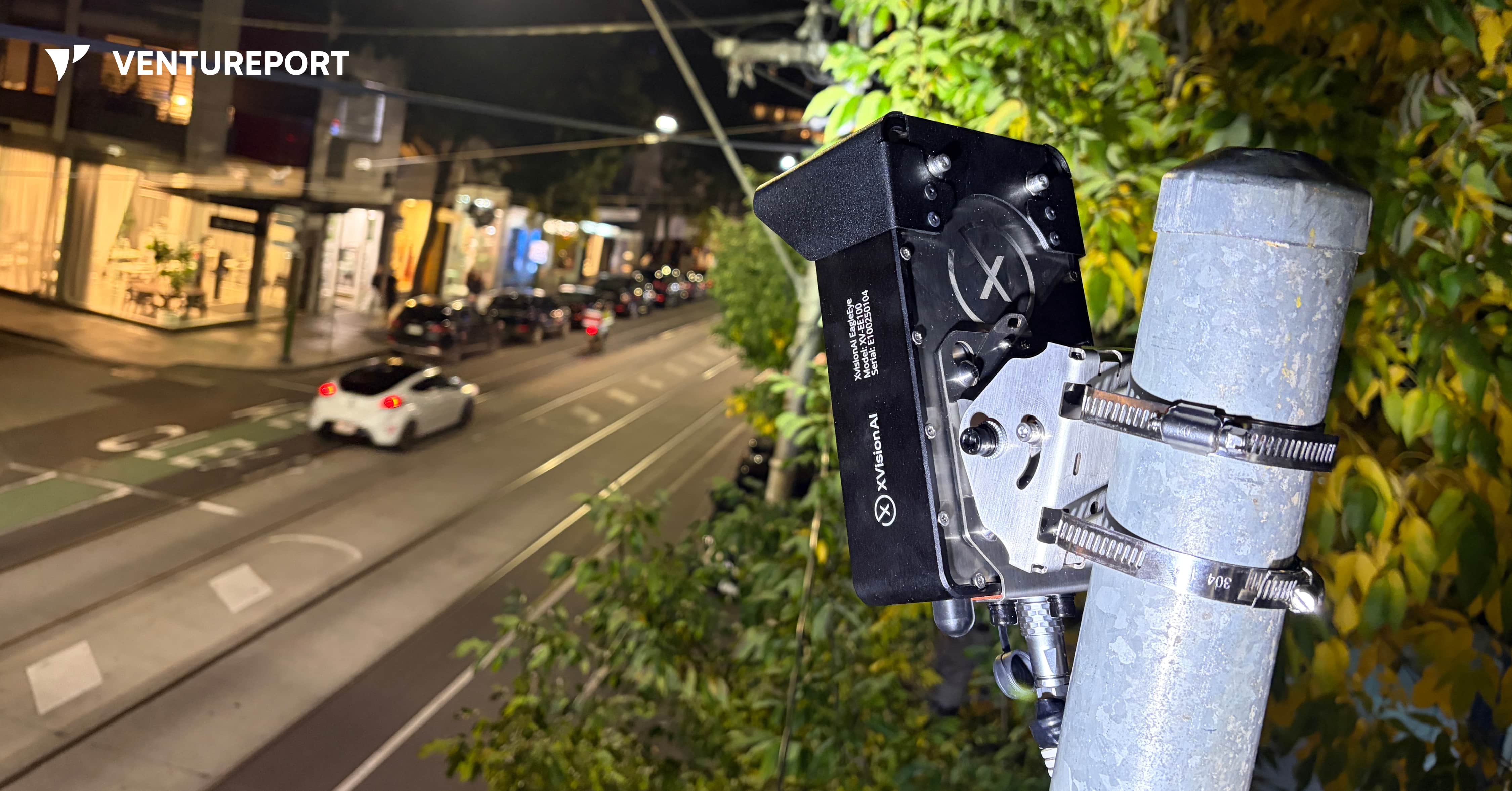
XVision’s roadside device uses computer vision to help intersections respond to traffic in real time. IMAGE: XVISION AI
According to Australian government figures, 1,326 people died on Australian roads in the 12 months to July 2026, up 0.9% from the previous 12-month period. The latest available national data also shows that road crashes led to around 36,000 hospitalised injuries. Yet many near misses are never reported.
Consider a driver turning across a pedestrian crossing without noticing someone still on the road. They miss each other by a few seconds. No one is injured, and the incident is soon forgotten. For transport authorities, however, that near miss could be an early warning of a dangerous intersection.
Australian intelligent transport startup XVision AI wants to help road authorities capture these warning signs and respond earlier. “We’re trying to create the intelligence layer for roads and infrastructure,” founder Simon Maselli says. His goal is to build smart road infrastructure that can see what is happening, understand the risks and take action when necessary.
Founded in 2023, XVision AI develops AI-powered traffic management systems for governments, transport agencies and infrastructure operators. Its technology monitors how vehicles, cyclists and pedestrians move through intersections, roads and work zones. It can count and classify road users, measure traffic speeds and queues and identify potentially dangerous interactions in real time.
Maselli came to road technology through engineering, industrial systems and testing. He previously worked on complex projects for companies including BHP Group, a major Australian multinational mining and metals corporation. He also spent time at Keppel FELS in Singapore, where he was involved in certification, approvals and scientific testing for ships.
The idea for XVision came after Maselli started his own testing company about ten years ago. One customer relied on an infrastructure system assembled from components made by several vendors. When the original provider failed to service it properly, the customer asked Maselli’s company to reproduce it.
His team succeeded, but the replacement inherited the same fundamental problem: it was large, complicated and made up of too many separate components. Maselli saw a similar pattern in road infrastructure, where one product might handle detection, another communication and additional equipment that allows for the connections between them.
“I thought there had to be a smarter way to put all those parts into one small device,” Maselli recalls. The solution also had to be easy to install without extensive roadworks, expensive components or several suppliers. That thinking eventually led to EagleEye, XVision AI’s flagship road intelligence system.
EagleEye uses two camera lenses to create a three-dimensional view of the road. Unlike an ordinary camera that only records footage, the device uses edge AI to process what it sees locally. It detects road users, follows their trajectories and analyses how they interact.
Maselli describes its functions in three stages: perception, thinking and communication. The system first identifies vehicles, pedestrians and cyclists. It then examines their speed, direction and behaviour. Finally, it can communicate with roadside infrastructure such as traffic controllers and digital signs, as well as vehicles equipped with vehicle-to-everything technology, commonly known as V2X.
For example, if a vehicle approaches a conflict area — the part of an intersection where different paths cross — at a dangerous speed, EagleEye could keep other approaches on red until it passes. If pedestrians have not finished crossing, the system could hold conflicting traffic for longer. Connected vehicles could also receive warnings about hazards or people their drivers cannot yet see.
These applications reflect Maselli’s vision for more proactive road safety. Authorities often rely on crash reports to identify dangerous locations, meaning someone may need to be injured before a problem receives attention. Short traffic surveys offer useful information, but they can miss changing road conditions and near misses that occur outside the survey period.
XVision AI aims to give traffic engineers a continuous view of movement, congestion and risk. Near-miss data could help them identify recurring conflicts, adjust signal timing or investigate an intersection before a serious collision occurs. Maselli puts the motivation simply: “One death on the road is too many.”
The company is also addressing the fragmented nature of traffic infrastructure. A single intersection may use road loops, radar, cameras, thermal sensors and analytics software from different suppliers. Bringing these systems takes time and can make upgrades expensive. Maselli estimates that a typical road upgrade in Australia can cost around AUD1.4 million and take 18 months.
EagleEye combines several of these functions inside one unit mounted on an existing pole and connects to the traffic controller. Maselli says installation only take a couple of hours, reducing the need for disruptive civil works. Although EagleEye may cost more than an individual conventional sensor, XVision argues that it can lower the overall cost by replacing several separate systems.
The software behind the hardware may be the company’s strongest commercial advantage. Customers begin with basic traffic analytics and data collection, then activate more applications on the same device. XVision has developed around ten modules, including adaptive signal control and traffic enforcement functions.
Its strongest commercial advantage is, however, the software behind the hardware. Customers begin with basic analytics and data-collection functions, then activate additional applications on the same device. XVision has developed around ten modules, including functions for adaptive signal control and traffic enforcement.
“The important thing to remember is that the hardware is only part of the business,” Maselli says. “Our core business is selling software modules.”
He calls the model “software-defined infrastructure”. Conventional road equipment is usually installed for a fixed purpose and may remain unchanged for years. XVision’s devices can receive new functions through software updates, allowing road authorities to expand their systems without repeatedly replacing roadside hardware.
The wider XVision AI platform includes two other devices. “Scout” is a smaller, solar-compatible sensor designed for quick deployment along roads and corridors. It cannot directly control traffic equipment like EagleEye, but it can collect traffic data and support wireless V2X communication. “Outpost”, on the other hand, places similar technology on a portable trailer, making it suitable for roadworks, temporary traffic studies and work zones. XVision Command brings information from these sites into one platform for monitoring, analysis and reporting.
By June 2026, Maselli said XVision had secured around 190 paid deployments across five Australian states and territories, along with six international pilots. The company has also tested its technology in Vietnam and Thailand.
Nevertheless, expanding into more markets will require more than accurate AI. Traffic enforcement and control systems must meet technical standards that differ between countries and sometimes between states. Some XVision modules, including speed enforcement, red-light enforcement and seatbelt detection, still require regulatory approval before customers can activate them.
Certification is costly and time-consuming, but it could strengthen XVision’s position once the necessary approvals are in place. Maselli describes the enforcement applications as the company’s “highest-value modules”. He estimates that certification could add AUD25 million in lifetime value across its existing deployments without installing new devices, though this remains the company’s own projection.
“Once we’re certified, we’re no longer competing in that highly competitive segment,” Maselli says. “We move into blue-ocean territory.” In practical terms, approval would allow XVision to compete in a more specialised market with fewer certified rivals.
As with any surveillance technology, privacy presents another challenge. Roadside cameras can make members of the public uncomfortable, even when they are being used for traffic analysis rather than surveillance. To address this, XVision works with customers to display signs explaining why the equipment is present. Its system also blurs video and displays it at low resolution by default, while access to identifiable, high-resolution footage requires additional authorisation.
Maselli views Australia as a proving ground for a much larger market. He sees opportunities in India, Vietnam and Thailand, where governments are investing in traffic technology. The U.S. is another target because of its larger infrastructure budgets and growing demand for connected road systems.
XVision AI still has to navigate government procurement, regulatory approval and competition from established traffic-equipment suppliers. Supporting physical devices across several countries will also be harder than expanding a cloud-based software platform.
Its advantage lies in how the technology was developed. XVision grew from years of solving practical infrastructure problems, including the fragmented system that first convinced Maselli there had to be a simpler approach. If the company succeeds, near misses that once disappeared without a trace could become the evidence road authorities need to prevent the next crash.